See which controls your algorithm really has, before it touches a live account.
Aurelia Spes reads the trading code you paste in and checks it against four pillars: FCA rules, UK market abuse rules, risk management, and the kill functionality set out in RTS 6 Article 12. You get a RED, YELLOW or GREEN verdict, the rule behind each finding, and the code that closes the gap.
No card needed for your free check. Confirm your email and paste your code.
Compliance terminal · Strategy Lab · Code you can paper trade
Four strategies. One verdict scale.
Pick a strategy and reveal its report. Each one is a recorded run of the terminal's built-in rule scanner on that exact code, reproduced as it came out. In the live terminal, the full analysis also has an AI model read what your code does.
GREEN: every required pillar passes: the automated checks found no issues. Three pillars are required for retail and professional clients and four for firms; market abuse is reported for everyone and required for firms. Whether your whole operation is compliant is a wider question than one file. YELLOW: legal, but not recommended. The controls the rules require are there, and the strategy carries a high risk (martingale sizing, averaging down, no drawdown limit) that would show in a backtest. The report names the risk and the backtest column where it appears. RED: a basic control is missing. Don't deploy it.
These are recorded examples, so nothing you do on this page is analysed. A verdict is software output about the controls present in submitted code. It isn't regulatory approval, certification or advice, and it doesn't move any compliance obligation away from you.
From risky code to GREEN in under a minute
A screen recording of the terminal on a test account: a new account, a bot with no safety controls, the RED report, the fixes, and the same strategy passing every required pillar.
- Create an account: your first check is free
- Choose the account type and asset class, then paste the code
- RED: no kill switch, no loss limits, no audit trail
- Add the controls the report asks for, then pick a plan for more checks
- GREEN: every required pillar passes
- Stress-test the idea in the Strategy Lab
From paste to verdict
Five steps, in order. Each one changes what the next one checks, which is why your account type comes before the analysis, not after it.
Choose your account type
Retail, professional or eligible counterparty, then the asset class. This sets the leverage limits and rules the check applies. COBS 22.5 COBS 22.6
Paste it, or attach the files
A bot is rarely one file, so attach the lot: up to 12, analysed together, in Python, MQL4/5 (MetaTrader), Pine Script (TradingView), C# (cTrader) or whatever you write in. A kill switch in risk.py counts for entry.py. Your code is treated as data to analyse, never as instructions, so a comment inside a file can't steer the verdict. There's an automated test for exactly that.
Four pillars, scored separately
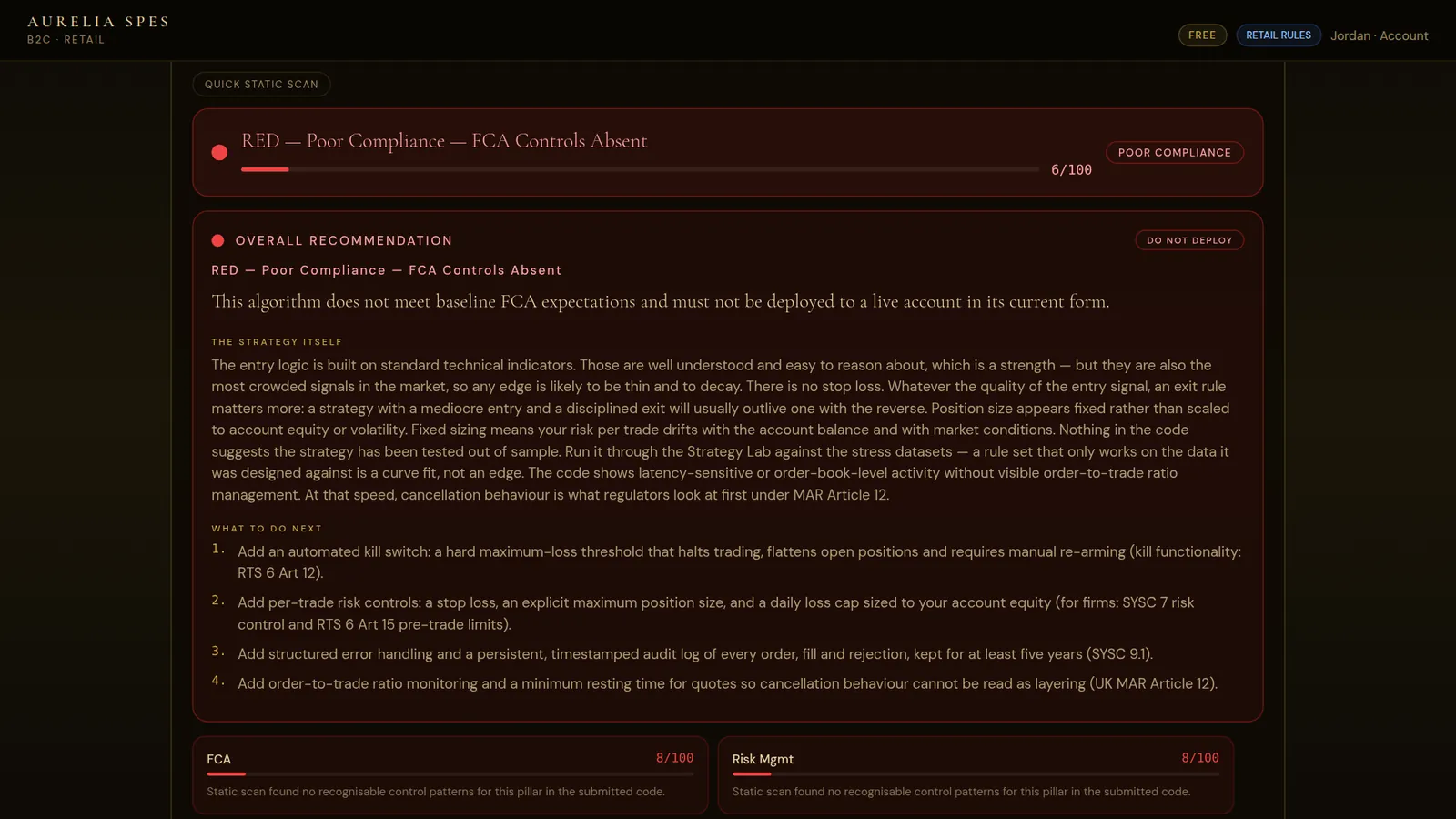
FCA rules, market abuse, risk management and kill switch each get a score out of 100. The verdict rules are enforced on our server afterwards, so code that fails the FCA pillar can never come back GREEN.
Fixes, not just findings
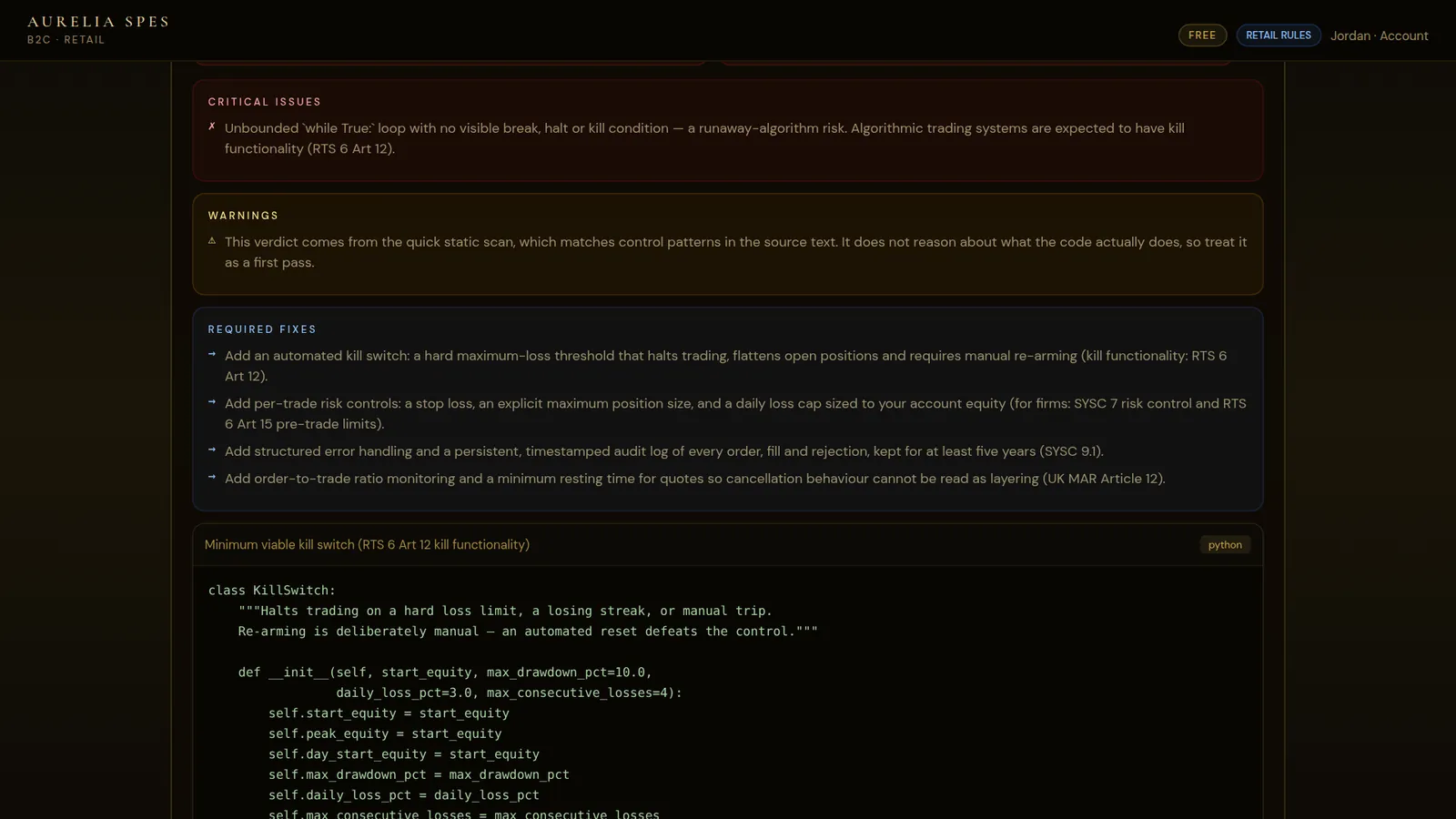
Each issue comes with the rule behind it and a suggested fix: a working kill switch, a sizing function, an audit-log write.
Backtest it in the Strategy Lab
A separate rating for the simulation: how it behaved, whether there's enough evidence to conclude anything, and what the risk controls cost. Simulated results only, never a forecast.
Every finding names the rule it comes from
A score you can't question is a score you can't learn from. Each pillar names the rules behind it, so you can disagree with the reasoning, not just the colour.
FCA rules
Leverage caps by client category and asset class, the ban on selling crypto derivatives to retail clients, pre-trade limits, order records kept for at least five years, and testing before live use.
Market abuse
Layering, spoofing, wash trades, front-running and quote stuffing patterns, order-to-trade ratio management, and timestamps you can rely on.
Risk management
Stop losses, a maximum position size, volatility-aware sizing, drawdown control, a daily loss cap and concentration limits: present, and actually used when orders are placed.
Kill switch
An emergency halt, a hard maximum-loss stop, a losing-streak breaker, flattening positions on halt, going risk-off when the connection drops, and safe reconnection: the kill functionality RTS 6 Article 12 sets out for firms.
A backtester that tries to talk you out of it
The simulation is deliberately pessimistic, because a backtest that flatters you is worse than no backtest at all.
A signal from bar i fills at the open of bar i+1. No fill ever uses a price the strategy has already seen.
Where a stop and a target sit inside the same bar, the stop is assumed to fill first. Fees and slippage are charged on both sides of every trade.
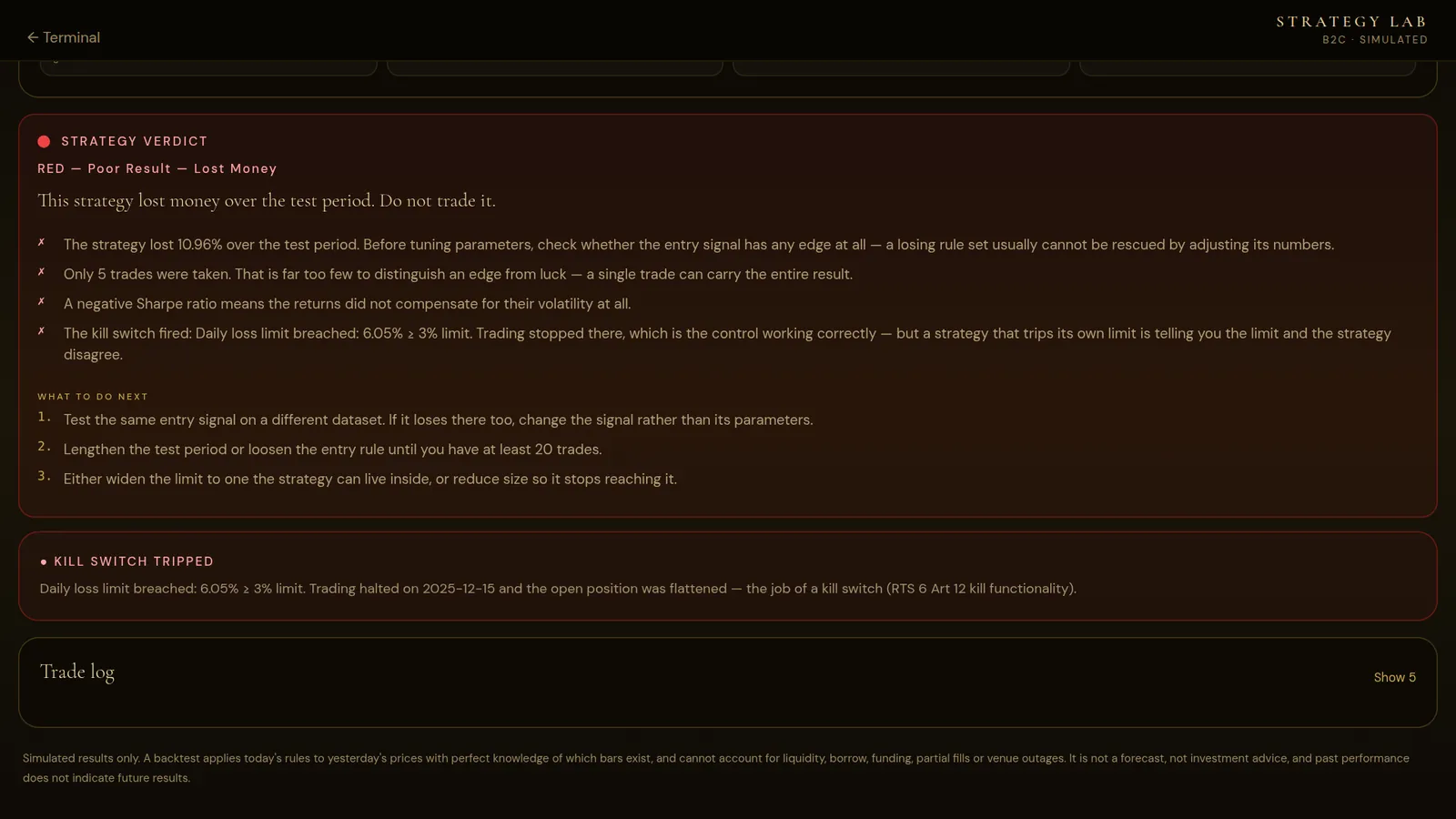
A daily loss cap, a maximum drawdown and a losing-streak breaker close the position and stop the simulation, the way kill functionality (RTS 6 Art.12) is expected to work in a live system.
A retail FX strategy asking for 50:1 is cut to the 30:1 cap in COBS 22.5, and the report says why. A retail crypto strategy runs unleveraged, because COBS 22.6 bans selling crypto derivatives to retail clients. The compliance check applies the same caps.
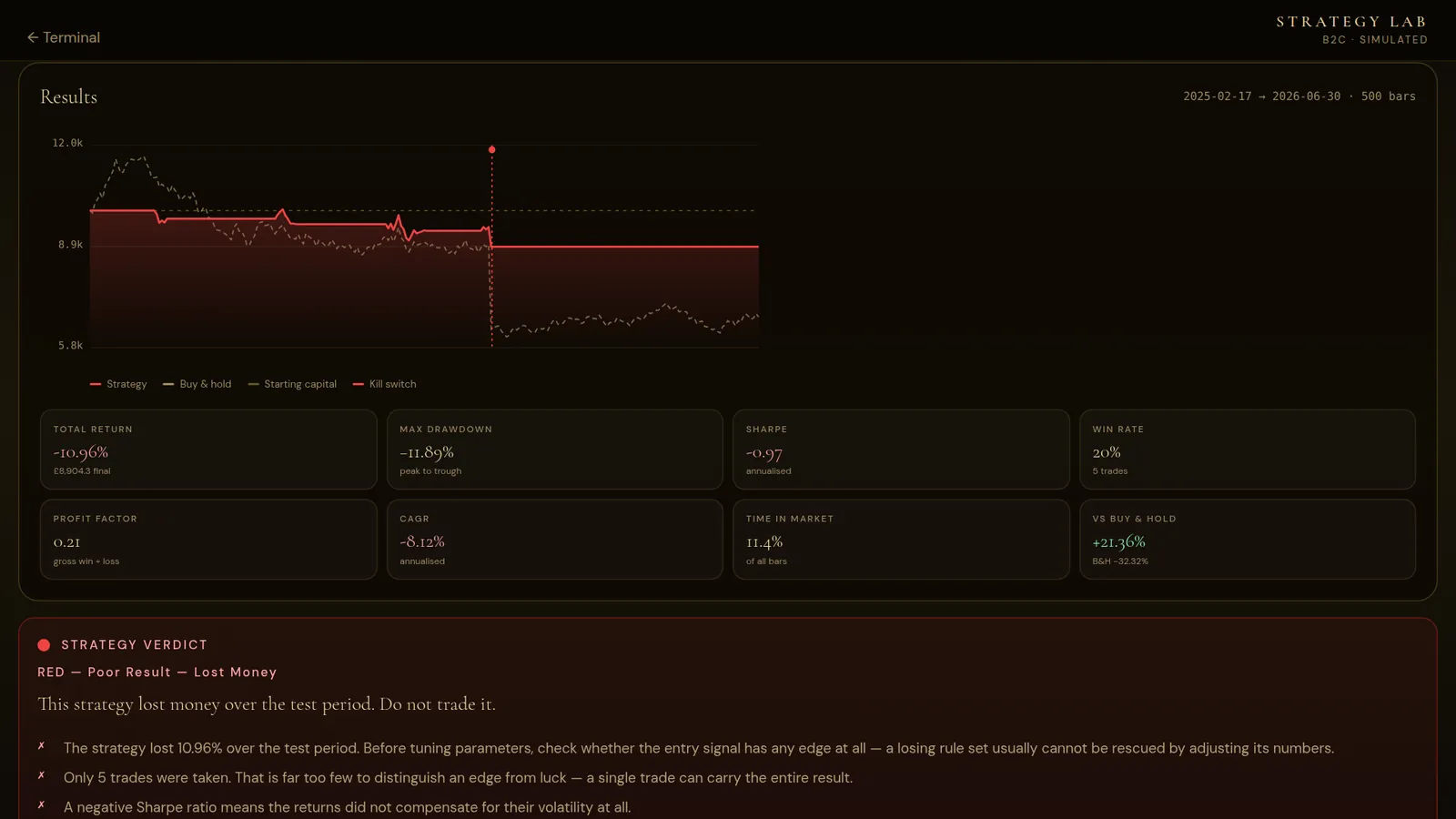
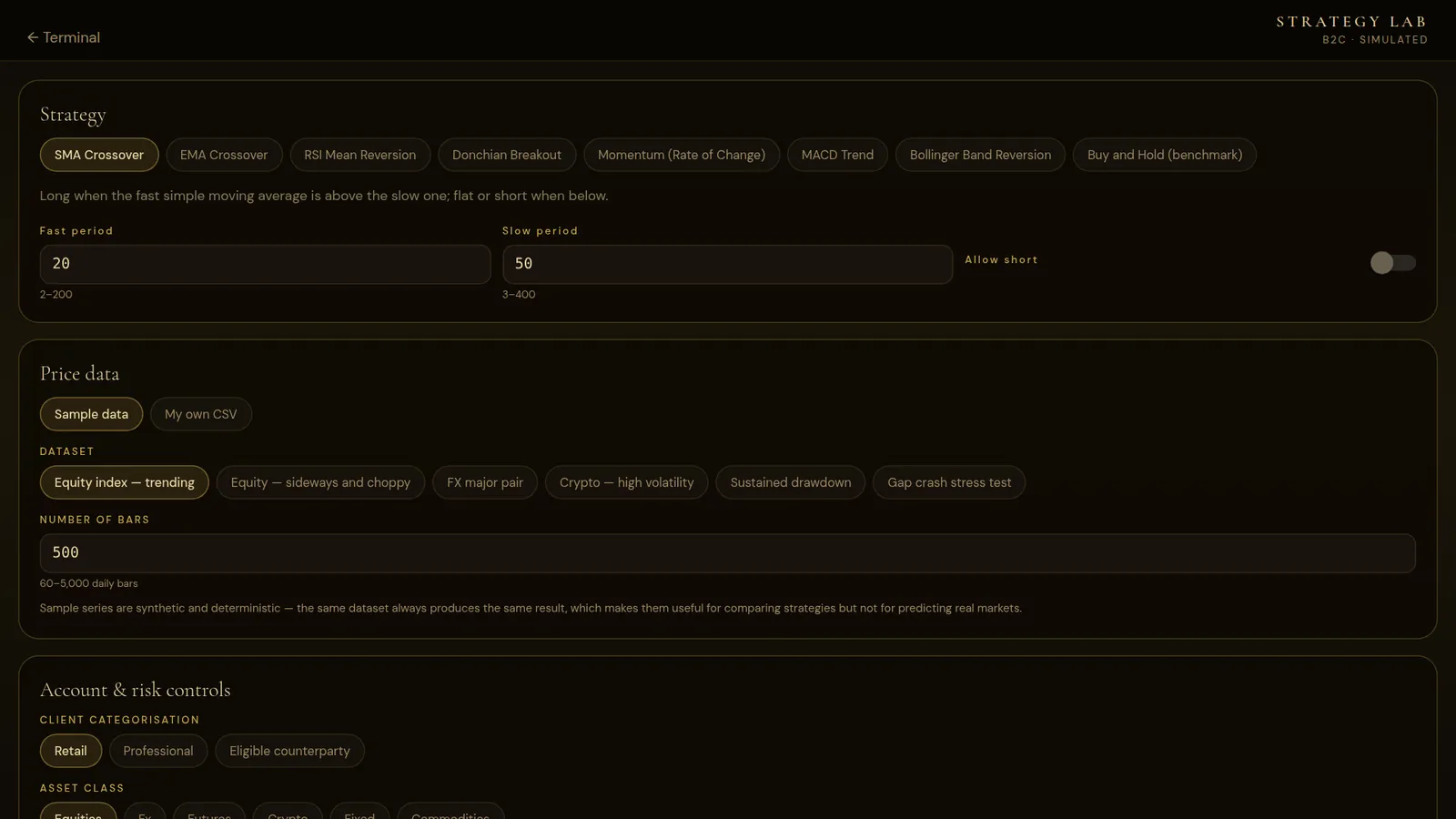
SMA crossover · EMA crossover · RSI mean reversion · Donchian breakout · Momentum (rate of change) · MACD trend · Bollinger band reversion · buy-and-hold benchmark.
Trending equity index · sideways, choppy equity · major FX pair · high-volatility crypto · sustained drawdown · gap-crash stress test. The sample series are synthetic and repeatable: the same dataset always gives the same result.
Total return, CAGR, maximum drawdown, Sharpe, Sortino, Calmar, win rate, profit factor, expectancy, time in the market, and best and worst trade: every run compared with buy-and-hold.
A backtest applies today's rules to past or synthetic prices and can't account for liquidity, borrowing costs, funding, partial fills or outages. Simulated and past performance is not a reliable indicator of future results. Nothing in the Strategy Lab is a forecast or investment advice, and trading can lose you money.
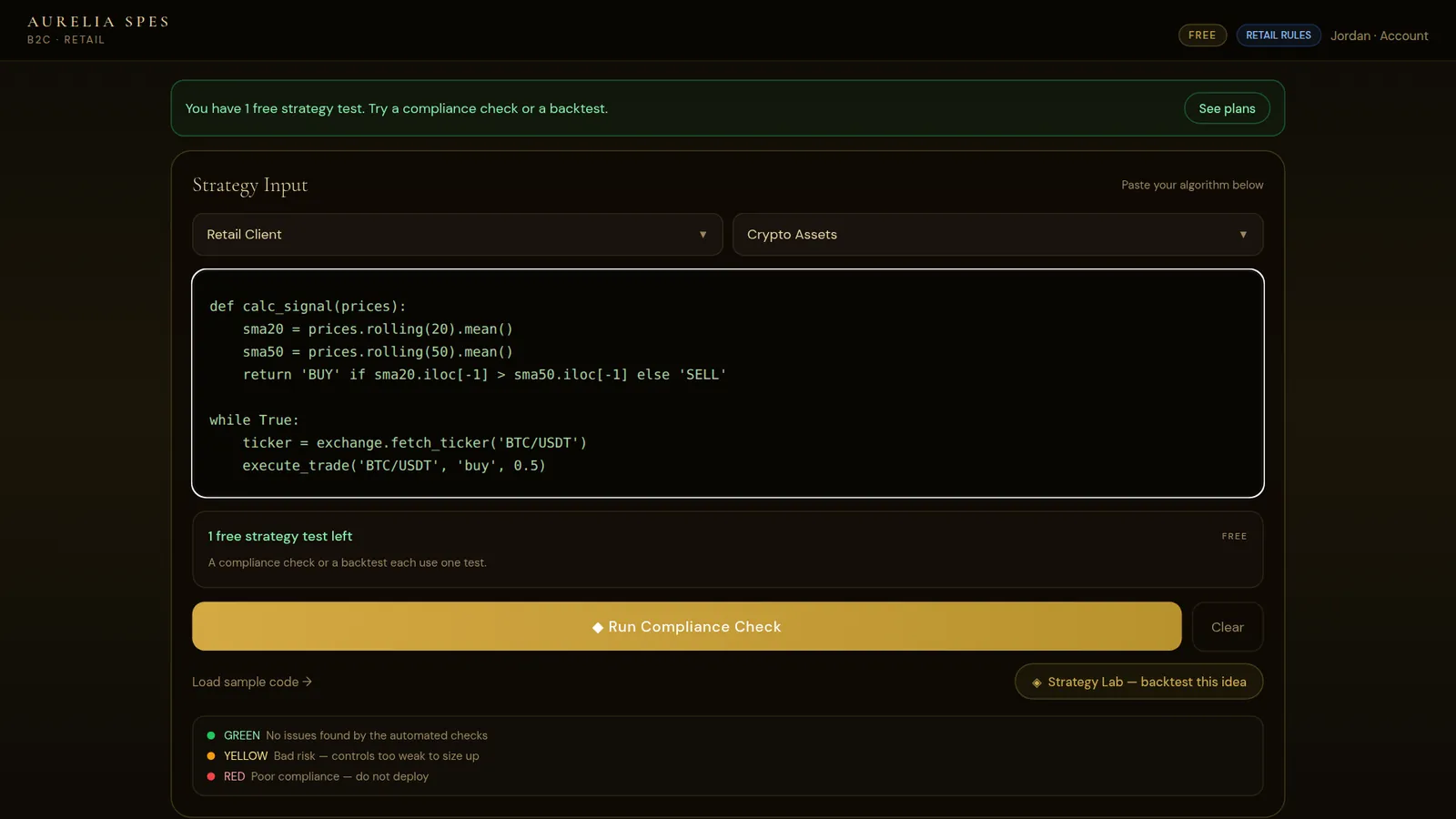
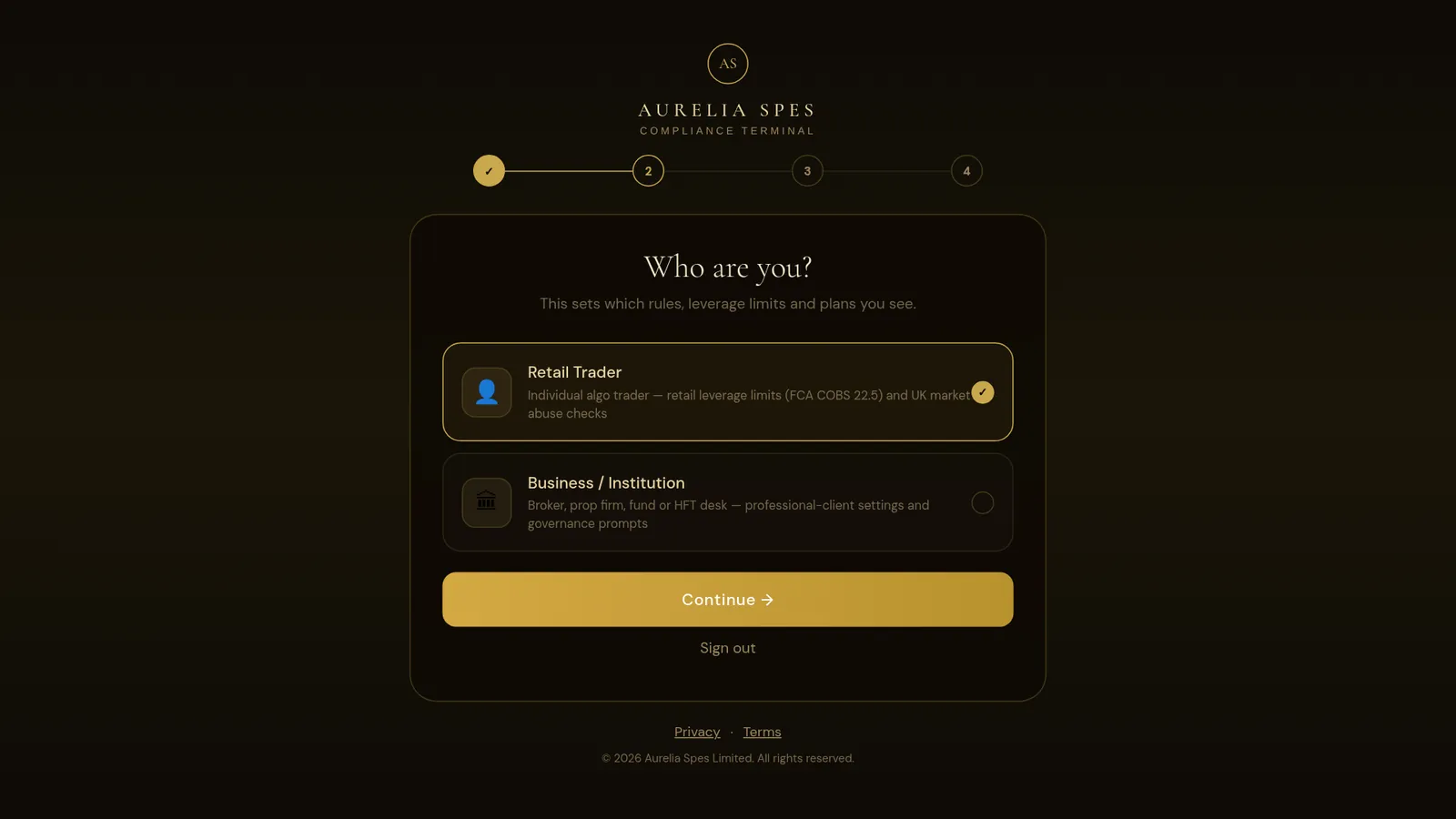
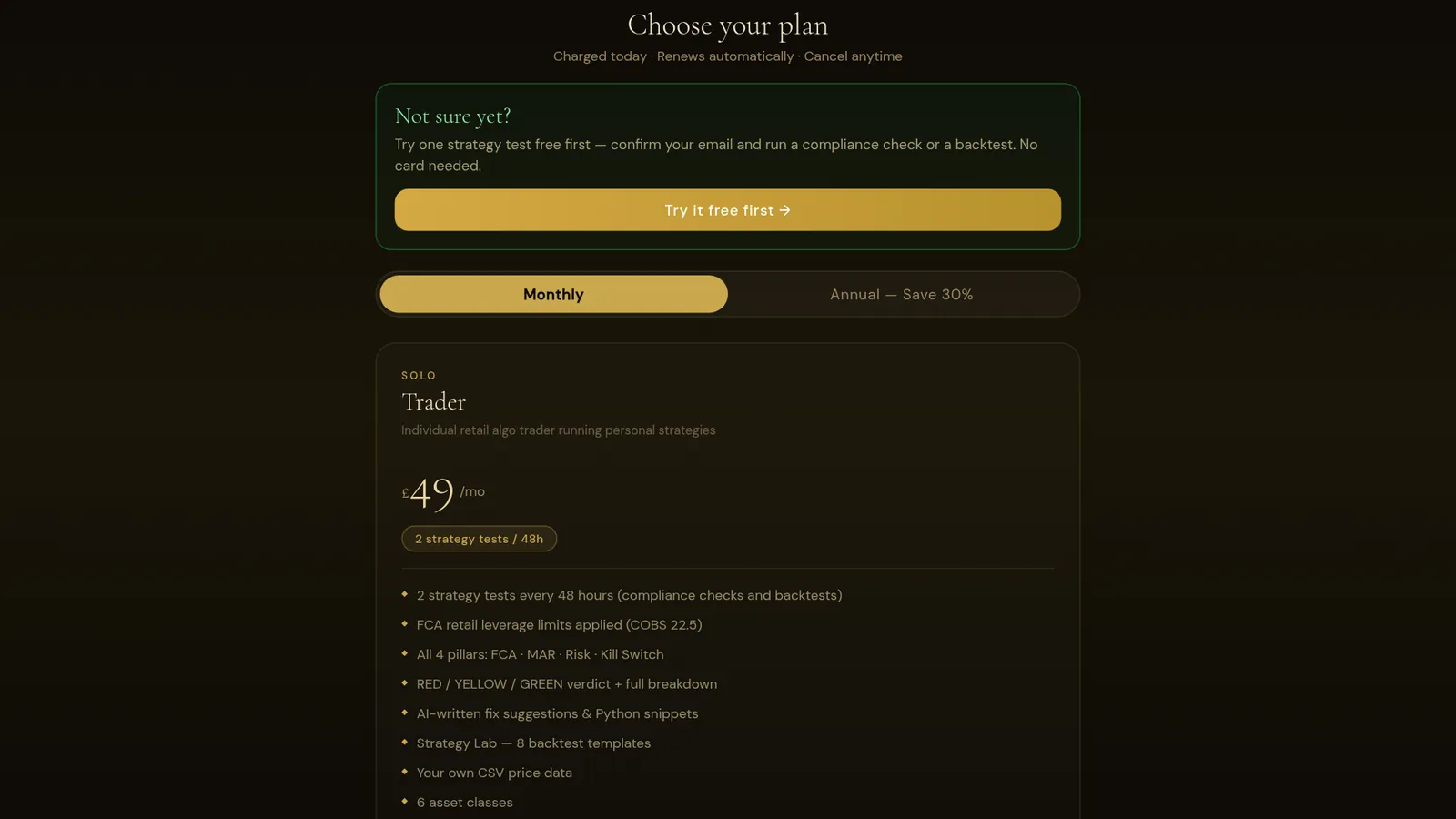
Screens from the live terminal
Not mock-ups. These were captured from the current release while it was running.
What Aurelia Spes actually does
Whether an algorithm behaves safely and whether it made money in a simulation are two different questions. Most tools only look at the second. Aurelia Spes checks the first, and gives you a simulator for the second in the same place.
Paste a strategy: Python, pseudocode, an execution loop, a sizing function. The terminal reads it against the rules that apply to your client category, because a retail FX strategy asking for 50:1 leverage and a professional client asking for the same thing aren't the same finding. It returns a verdict, a score out of 100 for each pillar, the specific issues, and suggested code to fix them.
Then take the same idea into the Strategy Lab and see whether it survives a price series, including a sustained drawdown and a gap-crash stress test built to break it. From Professional, turn the settings you tested into code, in Python or Pine Script, with the risk controls built in, and check that code in one step.
Aurelia Spes, the Golden Hope. Aurelia is golden, spes is hope: the hope that comes from discipline, not from speculation. We hold to one principle: clarity over complexity, discipline over speculation.
- Individual algorithmic traders: UK market abuse rules apply to you directly, and the firm-level controls in the other pillars are the standard brokers expect
- Traders your broker has categorised as professional clients, where different leverage rules apply
- Brokers and regulated firms checking client strategies before granting API access
- Prop firms and hedge funds documenting pre-deployment control checks
- High-frequency and market-making desks facing order-to-trade ratio and layering scrutiny
Aurelia Spes Limited is not authorised or regulated by the Financial Conduct Authority. The terminal is software. A verdict isn't regulatory sign-off, legal advice or investment advice, and it doesn't transfer any compliance obligation away from you or your firm.
In your browser today
The web terminal is live and works in any modern browser, on a computer or a phone, with nothing to install.
iPhone, Android and desktop apps are built but not released yet. Join the list and we'll email you when each one is available. We won't show a store button until there's a listing behind it.
Your first check is free. Then pick a plan.
Create an account and run your first check free, no card needed. Every plan comes with credits: one credit pays for one compliance check or one backtest. Plans are paid monthly or yearly from the day you subscribe and renew automatically at the same price until you cancel, which you can do at any time from your account.
When your plan's credits run out they refill in full 48 hours later. To keep going before then, top up with extra credits, with or without a plan: a one-off payment, no subscription. Extra credits never expire, and they are used only after your free credit and your plan credits, so you never pay twice for the same test. Or move up a plan, straight away.
- Extra credits: £3.50 each, at least 2 (£7)
- Choose any number from 2 to 100 in the web app; for example 2 for £7 · 5 for £17.50 · 10 for £35 · 20 for £70
- In the iPhone and Android apps, packs of 2, 5, 10 or 20 at the store’s price
A licence to use compliance-checking and backtesting software. You're not buying regulatory approval, an opinion from a qualified compliance professional, investment advice or a trading service. Aurelia Spes Limited holds no client money and executes no orders.
Cancel whenever you like
There's no cancellation fee on any plan. Cancelling stops the next payment.
If you're a consumer, you can cancel a new subscription within 14 days of buying it and get a refund. Because the service starts straight away when you ask for it, we may deduct an amount for the part you used before cancelling. To use this right, email Founder@aureliaspes.com within the 14 days.
In the terminal: Account → Cancel subscription, or Manage billing. Your plan stays active until the end of the period you've paid for and isn't renewed. You don't need to give a reason.
| Situation | What happens | Fee |
|---|---|---|
| Within 14 days of buying Consumers | A refund, less an amount for any part of the service you used before cancelling. | None |
| Monthly plan, after 14 days | You keep access until the end of the month you've paid for. Nothing more is taken. | None |
| Yearly plan, after 14 days | You keep access until the end of the year you've paid for. Part-used periods aren't refunded. | None |
| Business plans | Cancel the same way, in the terminal. Access runs to the end of the paid period. | None |
| Extra credits, within 14 days Consumers | A refund for every credit you haven't used. A credit you've already used can't be refunded. Extra credits never expire, and deleting your account loses any left (we'll tell you how many first). | None |
| We change the price | At least 30 days' notice. Cancel before it applies and you never pay the new price. | None |
| A payment fails | Your plan keeps working for a short grace period while the payment is retried, then pauses until it goes through. | None |
| We close your account for a reason other than a serious breach of the terms | We refund any unused prepaid period. | None |
The 14-day right applies to individuals buying for themselves rather than for a business. Nothing here affects your statutory rights. The full Terms of Service apply.
The short version
When you create an account you agree to our Terms of Service and receive our Privacy Policy. These are the points that matter most.
Aurelia Spes Limited
Registered in England and Wales, company number 17299015
Registered office: 44 Henderson Way, Kempston, Bedford, England, MK42 8NP
Email: Founder@aureliaspes.com
We're software, not a regulated firm
Aurelia Spes Limited is not authorised or regulated by the Financial Conduct Authority. Nothing in the service is legal, regulatory, tax or investment advice, a personal recommendation or regulatory approval. We hold no client money and place no trades.
What GREEN means
A GREEN result means our automated checks found no issues, not that a strategy is lawful, suitable or profitable. Much of the rulebook we check against (SYSC, COBS, RTS 6) binds FCA-authorised firms; UK MAR applies to everyone. Responsibility for your trading and your obligations stays with you.
Your code
You keep all rights in the code you submit. We use it only to produce your report. With the full analysis switched on, it's sent to our AI provider, Anthropic, for that purpose and isn't used to train AI models. We keep the report, not the code.
Your data
We handle personal data under the UK GDPR. You can delete your account and reports yourself in the terminal. We don't use advertising or tracking cookies, and we don't sell data.
Complaints
Email Founder@aureliaspes.com with “Complaint” in the subject and we'll try to put things right. As we're not an FCA-authorised firm, the Financial Ombudsman Service doesn't cover us. If we can't resolve a consumer complaint, we'll tell you about alternative dispute resolution.
QDoes a GREEN verdict mean I'm compliant?
No. It means the checks found the controls they look for in the code you submitted. Compliance is a property of your whole operation (governance, records, oversight, the people responsible), not of one file. Treat GREEN as “this code isn't the thing standing in your way”.
QAre you FCA-authorised?
No. Aurelia Spes Limited is not authorised or regulated by the FCA. We sell analysis software and don't carry on any regulated activity. When the site names a rule, it's naming published regulatory material that the checks are based on, not claiming any link with the regulator.
QIs there a free trial?
Your first check is free once you've confirmed your email, no card needed. It's per person, not per account: a second account on the same inbox shares it. After that, top up with extra credits or choose a plan. Consumers also have a 14-day right to cancel a new subscription or a top-up (see § 10).
QHow do credits work?
One credit pays for one compliance check or one backtest; they are interchangeable. Solo Trader (Tier I) has 2 credits, Professional (Tier II) 5, Institutional (Tier III) 10, Broker Lite 5, Prime / Hedge Fund 12 and HFT Enterprise 20. When they run out they refill in full 48 hours later, not on a fixed day; unused plan credits don't roll over. To keep going before then, top up with extra credits (2 for £7, then £3.50 each, up to 100 at a time in the web app) or move up a plan. If you move up part-way through, the credits you have already used in that 48 hours still count: moving up gives you the difference straight away.
QCan I turn a backtest into code?
Yes, from Professional (Tier II) and on every business plan. After a backtest, Generate code writes the strategy you tested, with exactly the parameters and risk limits you set, as Python or Pine Script (TradingView). Every file carries the same risk layer: a stop on every order, loss limits that close the position and keep trading halted until you re-arm it, a leverage cap, order-rate limits, error handling and an audit log. Generating code uses no credit; Check compliance on it uses one, and the report is linked to the backtest. Settings that could never protect anything (no stop, a 100% drawdown limit) or that would be prohibited for a retail client (a crypto derivative) are refused with the setting to change. Generated code is a starting point you paper trade first: it isn't investment advice, and it isn't a statement that the strategy is lawful, compliant or suitable.
QIs my strategy code safe?
We use your code only to produce your report, and we keep the report, not the code. Reports are visible only to you: asking for someone else's report gets the same “not found” answer as asking for one that doesn't exist. The one exception is a firm's team, and only if you accept an invitation to it: the plan owner can then see the checks you run while you are a member, never the ones from before you joined or after you leave. Don't paste live API keys or passwords. The checker flags hard-coded credentials, but the safest key is one that never leaves your machine.
QWhich languages can I check?
Python, MQL4 and MQL5 (MetaTrader), Pine Script (TradingView) and C# (cTrader, NinjaTrader) are read directly: the checks know what a stop loss, a kill switch and a lot-sizing function look like in each of them, and the suggested fixes come back in the language you submitted. Anything else is analysed too: the report says which language it read, so you can see what it assumed.
QCan I check a project of several files?
Yes. Drag a whole folder onto the terminal in your browser, or attach up to 12 files, and they are checked as one strategy, so a control in your risk module counts for the file that calls it. From a folder, dependency and build folders are left out, files that look like keys or secrets stay on your computer, and the files most likely to hold trading and risk logic are chosen first; you're told what was left out and why. The limit is 60,000 characters of code in total, and the report lists the files it read.
QCan I get to an old report?
Every check you run is kept on your account. Past reports in the terminal lists them (what you named it, when you ran it, the language, the files and the verdict) and opens any of them again in full. They're visible only to you (or, if you accept an invitation to a firm's team, also to its plan owner for the checks you run while a member), and deleting your account deletes them, except checks you ran on a firm's plan, which stay on the firm's record.
QHow does the analysis work?
The full analysis uses an AI model (Anthropic's Claude) to read what your code does. A built-in rule scanner matches control patterns in the code (stop losses, sizing, kill switches, audit logs) and steps in if the AI is unavailable. Either way, the RED / YELLOW / GREEN rules are enforced on our server afterwards, and the report says which engine produced it. Your code is never run.
QHow accurate is it?
We measure it on strategies the checks have never seen, written and labelled by independent reviewers who never saw the rules. On the latest such test (60 verdicts, October 2026) the rule-based scan agreed with the reviewers on 80% of verdicts; most of its misses were on the cautious side. The AI engine has not been measured that way yet, so we don't quote a figure for it. Every report says it can make mistakes. Check each finding against your own code.
QCan a comment in my code change the verdict?
It shouldn't. Your code is treated as data to analyse, never as instructions, and the verdict rules are enforced on our server afterwards, so a comment claiming a control exists doesn't put one there. Automated tests check this. But an AI model can still be misled in ways nobody has thought of yet, which is one reason the rule scanner cross-checks every AI report and every report says it can make mistakes.
QWhen will the apps be available?
The iPhone, Android and desktop apps are built but not released yet. Join the list in § 08 and we'll email you when each one is out. The web terminal works on phones in the meantime.
QCan my firm pay by invoice rather than card?
Yes, on Institutional, Prime / Hedge Fund and HFT Enterprise. Ask for an invoice in the terminal under Your account: give us the company name, VAT number, purchase-order reference and the number of seats, and we email an itemised invoice with our bank details and 14 days to pay. Your plan starts the day the payment clears. On every plan, paying by card also produces a proper itemised invoice: checkout asks for your billing address and VAT number, and business plans ask for the company name and PO number so they print on the invoice and on every renewal.
QCan my team share one plan without sharing a password?
Yes. Professional and above, and every business plan, come with seats: Broker Lite 3, Professional 5, Institutional and Prime / Hedge 25, HFT Enterprise 50, each counting the person who owns the plan. Invite a colleague by email in Your team; they create their own account with that address and join automatically, with their own password. The plan's credits are shared, and the person who owns the plan can see every check the desk has run and who ran it, which is the record the firm has to keep, and is written into our Privacy Policy.
QWhat does an auditor get?
Every check produces an evidence record you can download as a PDF: the report reference, the strategy name, when it ran and who ran it, the client categorisation and asset class, the language and the files read, a SHA-256 checksum of the code that was submitted, the rule-set version that produced the verdict, the engine and model used, a SHA-256 checksum of the report itself, and the verdict rules that were applied. That answers “which version of your checks produced this?” years later. The report checksum is computed from the report as stored, so the copy in your file can be shown to be the copy that was issued.
QDo you offer self-hosting or a security review?
Self-hosted deployment is on our roadmap and marked SOON on the plans. For a data processing agreement or a security review, use the form and tell us what you need.
QWho can use it?
Anyone aged 18 or over. The checks are built around UK rules, so they're most useful for strategies traded through UK-regulated brokers.
Contact us
For sales, business plans, security reviews, data requests or complaints, email Founder@aureliaspes.com or use the form. The form opens your email app with the right subject line. Nothing is collected by this page.